
Church Websites that Connect with Your Community are Rare.
Building a website for your church is hard. Building one your community cares about is even harder.
If you want to connect the gospel to the people you’re called to reach, you can’t afford to throw one together.
YOUR COMMUNITY DESERVES MORE!
If you want to connect the gospel to the people you’re called to reach, you can’t afford to throw one together.
YOUR COMMUNITY DESERVES MORE!
Your church website will either build a bridge or burn a bridge with your city.
Create a missional, effective website minus all the headaches!
Is Your Church Website Selfish?
Too many church websites focus on YOU, not your neighbor.

“We…we…we” Language
You know good missionaries don’t talk about themselves 24/7. Why does your church website.

Insider Lingo
“As it is in heaven”resonates with your elders, but it’s all Greek to your city…so are “elders” for that matter.

Ignoring Needs
Honestly, how many times has your neighbor asked about your current preaching series?
Introducing the DIY Church Website Course
Three Problems Solved in ONE Simple Course

Master Your Website Platform
You'll learn how to use the powerful platform your website is built on as you follow the modules. Best of all, it'll be 'caught' more than 'taught'.

Create Your Stunning Website Fast
You'll create your website in days instead of months. The layout and copy are crafted for missional churches so you'll know what to put where.

Engage Your Neighbors From the Start
You'll go beyond just 'having' a website. Each page connects you to your audience with empathy for where they are.
Here’s What You Get
Easy to follow, Step-by-step Videos
Professional Design
Exclusive access to hand-crafted templates designed for churches ready to engage their community.
Keep Track of Visitors
Learn how to connect forms to Google Drive spreadsheets and the built-in, easy-to-use CRM (Customer Relationship Manager). Never lose track of an interested visitor again.
Step-by-step Videos
Watch the videos and follow-along. Setting up your site requires no technical knowledge.
Everything You Need, with Nothing More
Setup your Home page, About page, and key ministry pages. You'll have everything you need to connect with the people you’re called to reach without the stuff you don't need.
Content & Design Tips for Best Practices
Each template includes example content. You'll learn more about what to say, where to say it, and how to say it so you relate to your neighbor and sound like good news.
Gospel Integration
The videos and templates integrate perfectly with your passion to show and share the gospel. Translate your vision and mission into words that resonate with your neighbors.

You, Serving Them
Custom templates designed for missional churches. Every pixel placed to help you connect.
Your church website can look relevant without costing you a fortune. The custom templates set you up for success. And they're ONLY available inside the course.
Each template includes carefully crafted example copy to show you exactly what you need to say and how to say it. You get direction and inspiration in plain English, not filler lorem ipsum Latin.
Each template includes carefully crafted example copy to show you exactly what you need to say and how to say it. You get direction and inspiration in plain English, not filler lorem ipsum Latin.
Beautifully Simple. Here's How it Works.
Growing a church is hard work. Creating a missional website to help you do it shouldn't be.
Watch the Videos
Follow along with the video. Your learning curve just got flattened.
Enter our Template Number
Enter the custom template numbers, add your content and fast track your progress.
Connect Your Domain Name
Connect your domain name and start connecting with those you’re called to reach.

What Others Are Saying
Robby’s ideas for using church websites to communicate the heart of our church along with the heart of the Gospel was something that I don't think I would have easily found elsewhere!
Michael Shattock
Pastor, Kaleo St. Louis
I was embarrased by our church website and brand. Now I’m proud. Our new church website represents our vision and heart for our city uniquely. Robby will help you communicate your vision with clarity!
Brad Dunlop
Pastor, Mercy Hill Memphis
I was stuck. I needed help creating a brand and church website to connect with our context. After working with Robby, I have a solution that excites me and our people.
Rusty Langford
Pastor, Matthew's Table Church in TN
We were ready for our first website. CPSK helped me think through our site with the eyes of a missionary for our context. That was a game changer!
Tommy Rutledge
Pastor, Soma Asheville in NC
I’ve been in ministry for years. But when our mother church sent us out to plant, I had no idea how to create a missional brand or website aimed at the hearts of those we want to reach. I felt lost and anxious. Robby helped us craft a brand, message, and website that speaks to the specific people we’re called to reach. I learned how to translate our heart and vision into a meaningful message for our context.
Chris Harrell
Pastor, Compass Church in AR
Who Is This For?
The course is perfect for…
Missional Churches
Contextualize to your community
Lead
Pastors
Pastors
Frame your vision to relate to your neighbors
Church
Planters
Planters
Reach your city without breaking the bank
Staff & Volunteers
Simple enough for a team member or volunteer
Choose Your Course Package
Don't wait. Turn your outdated church website into a digital missionary today at an unbeatable value.
Team Course Package
For those who want to consistently communicate like a digital missionary
$1597
- 60-min 1:1 Live Introductory Call
- 2 Half-day Training for your Team (Repeatable Framework for your team to become ‘Digital Missionaries’)
- Easy to follow Step-by-step Videos
- Lifetime access to the course
- Every step of the process covered
- Custom Templates designed for churches to connect with your context
- Example copywriting
- Growing list of Tips & Tutorial Videos
- I’ll review & make recommended changes to your final site.
- (You’ll share your final site with me as an Editor)
Advanced Course Package
For those wanting Expert Help along the way
$797
- 60-min 1:1 Live Introductory Call
- Easy to follow Step-by-step Videos
- Lifetime access to the course
- Every step of the process covered
- Custom Templates designed for churches to connect with your context
- Example copywriting
- Growing list of Tips & Tutorial Videos
- Review of your final website with design & content suggestions (includes recording + checklist to easily track suggestions)
Standard Course Package
For those ready to build & launch their site
$397
- Easy to follow Step-by-step Videos
- Lifetime access to the course
- Every step of the process covered
- Custom Templates designed for churches to connect with your context
- Example copywriting
- Growing list of Tips & Tutorial Videos

Package Comparison
See what's included in each package.
Then choose the one that's right for you.
Then choose the one that's right for you.
Features
Standard
Advanced
Team
Lifetime access to course
Templates
Home, About, Get Connected, Plan Your Visit, Contact, Sermons, Giving, Blog
Modules
Module 16 includes a growing list of tips and power tricks with a video for each.
Videos
Each video allows you to follow along with my screen. It's as easy as "see me do it…now you do it"!
Copywriting
No 'dummy latin placeholder text'. Each section shows you exactly how to message your website. It's like having a master copywriter at your side.
Photos
You'll get a contact sheet showing you the EXACT photos you need to drop right into your website.
60-min coaching call
Get your questions answered, remove any obstacles, and get a plan together for how to launch your website as a ‘digital missionary’
Review & Recording
I’ll personally look through your entire website. I'll give you recommendations and some power tips to get your website dialed in with a checklist to easily track changes. The recording is yours to keep.
Communications Training for Your Team
Give your entire team a simple, repeatable, transformative framework for how to approach ALL communication like a digital missionary. Connect the good news to YOUR context.
Let me help
I'm Robby Fowler. As a brand strategist and top-level designer for almost 20 years, I specialize in building life-giving, inspiring, profitable brands. I started my personal brand in 2001…before 'personal brands' were a thing.
I also served 12+ years as a pastor and led a church planting residency.
I know firsthand the challenges of building a website for your church that actually connects with the people you long to reach.
I love helping churches build a gospel bridge to their community through the power of their website and brand.
I also served 12+ years as a pastor and led a church planting residency.
I know firsthand the challenges of building a website for your church that actually connects with the people you long to reach.
I love helping churches build a gospel bridge to their community through the power of their website and brand.
FAQs
Do you have some questions? Find answers below!
Hosting
Hosting is not included in the cost of this course. Hosting comes with with Tilda—the platform powering this course and your website. The current cost for an annual plan on Tilda is $10/mo.
Regardless of where you build and host your website, you will pay for hosting. That's true for WordPress sites, Wix, Weebly, SquareSpace, and other similar solutions.
Here's a brief cost comparison for hosting (note: prices may change):
Regardless of where you build and host your website, you will pay for hosting. That's true for WordPress sites, Wix, Weebly, SquareSpace, and other similar solutions.
Here's a brief cost comparison for hosting (note: prices may change):
- Wix: starting at $13/mo
- Weebly: starting at $10/mo
- SquareSpace: starting at $12/mo
- WordPress: pricing and quality greatly varies (WP has other costs associated with it, like paid templates, backups, etc.— plus YOU are responsible for security, maintenance, upgrades, plugins, etc.
Platform
This course is built using the Tilda platform. Your website and hosting is included with your Tilda subscription ($10/mo). While you may not be as familiar with the platform as others, it is an established, excellent solution. I’ve used them all! This is the ideal solution for your needs.
I've personally used the platform for clients for 4+ years. This website and the entire course are also running on the platform.
Tilda also has excellent ratings and debuted on Product Hunt over 4 years ago:
I've personally used the platform for clients for 4+ years. This website and the entire course are also running on the platform.
Tilda also has excellent ratings and debuted on Product Hunt over 4 years ago:
Domain Name
Yes, you can use your own domain name. You'll follow the steps in the video to connect your custom domain name after you've built your website.
If you do not own a custom domain name, I'll show you where to buy one and how to set it up. The cost of your new domain name will vary depending upon what address you choose (IE .com, .org, .io, .me).
For example, .com addresses cost approximately $13. I also provide a promo code for $2 off.
I always recommend buying your own domain name. While several solutions offer a “free domain name" for the first year when you sign up, the initial convenience often causes problems later.
Ideally, you want your domain name and DNS settings independent of your website solution provider. This gives you far more control and makes it easier to create landing pages, setup email, integrate other web services, and move platforms when you want in the future.
If you do not own a custom domain name, I'll show you where to buy one and how to set it up. The cost of your new domain name will vary depending upon what address you choose (IE .com, .org, .io, .me).
For example, .com addresses cost approximately $13. I also provide a promo code for $2 off.
I always recommend buying your own domain name. While several solutions offer a “free domain name" for the first year when you sign up, the initial convenience often causes problems later.
Ideally, you want your domain name and DNS settings independent of your website solution provider. This gives you far more control and makes it easier to create landing pages, setup email, integrate other web services, and move platforms when you want in the future.
Do I Need This
You can signup for Tilda on your own and build your website without this course. Like any platform, you will have to navigate the learning curve yourself. And that is often the most frustrating part of building your personal brand website—feeling alone in the process.
In contrast, the three benefits of this course are clear:
In contrast, the three benefits of this course are clear:
- Save time: Videos move you through the exact steps in sequential order
- Get templates: Our custom templates are professionally designed (Robby Fowler & Mike Kim) and primed for personal brands
- Guided Learning: As you follow the videos, you’ll learn how the platform works from a pro. With that knowledge, the sky is the limit for what you can add and build out in the future.
Other Costs
Your purchase includes everything necessary to complete this course, including a growing list of additional tips & tricks videos.
You will also need the following items to launch your website:
Your Tilda account includes the platform used to build and host your site. In addition, it also comes included with a simple CRM (Customer Relationship Management) and reporting, plus a number of other goodies.
You will also need the following items to launch your website:
- An account with Tilda ($10/mo)
- A custom domain name (approx $12 if you need to purchase one)
Your Tilda account includes the platform used to build and host your site. In addition, it also comes included with a simple CRM (Customer Relationship Management) and reporting, plus a number of other goodies.
Flexibility
You can add your own content in the future. This includes the ability to add landing pages, forms, an online store, and a host of features Tilda continues to add as the platform grows.
In addition, the guided learning you receive working through this course gives you a massive jump start. As you follow the videos, you'll learn how the platform works from a pro. With that knowledge, the sky is the limit for what you can add and build out in the future.
In addition, the guided learning you receive working through this course gives you a massive jump start. As you follow the videos, you'll learn how the platform works from a pro. With that knowledge, the sky is the limit for what you can add and build out in the future.
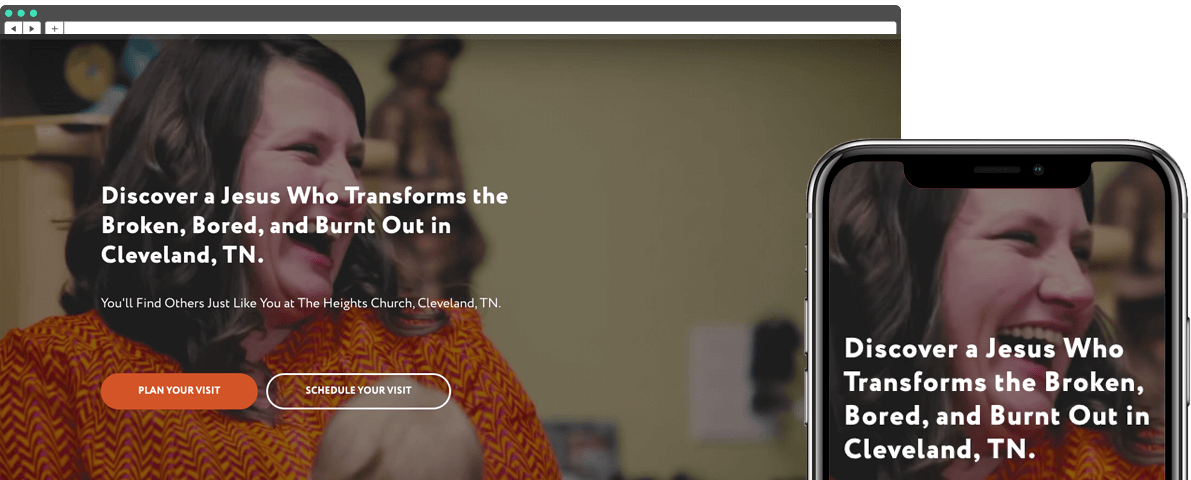
Design for All Screen Sizes
All of the blocks are designed to look great on every screen. There’s no need to do twice the work optimizing pages for tablets and smartphones.
Pages look great across all devices. We’ve thought it through so you can think about your content instead of technical issues.
Pages look great across all devices. We’ve thought it through so you can think about your content instead of technical issues.
Blog
Yes you can blog on this platform. I’ll show you how to setup your blog and create blog articles. There is a video covering both. And you get a blog index template, and two blog article templates.
Plus, I’ll share some great tips on how to use your blog connected with social media!
Plus, I’ll share some great tips on how to use your blog connected with social media!
Help
As part of this course, you'll be creating an account on the Tilda website platform. The good news is, you're now their customer (not just mine).
You'll have access to all of their help documentation and access to email/chat support from Tilda. So you'll never have to go it alone.
In addition, Tilda frequently adds new features. These come at no extra cost to you. One example is Tilda's built-in CRM. This is a recently added feature you'll benefit from as part of this course.
You'll have access to all of their help documentation and access to email/chat support from Tilda. So you'll never have to go it alone.
In addition, Tilda frequently adds new features. These come at no extra cost to you. One example is Tilda's built-in CRM. This is a recently added feature you'll benefit from as part of this course.
Processing Payments
Yes, you can process payments through Stripe, PayPal and bank transfers. You can also create a small online store and add products on the platform. (Payment processing and creating an online store is not covered in this course. But Tilda's help documentation walks you through the entire process step-by-step.)
Likewise, you can accept donations through your site. However, in most cases
If you do plan to sell products or accept payments, make sure you pay attention to changing privacy laws in and outside the USA (SSL, GDPR, etc.
Likewise, you can accept donations through your site. However, in most cases
If you do plan to sell products or accept payments, make sure you pay attention to changing privacy laws in and outside the USA (SSL, GDPR, etc.
100% Satisfaction Guarantee
No-Risk. All Reward.
Take two full weeks to try out the course. If you're not completely satisfied, only pay for the value you received. No questions asked.
Let’s NOT get technical.
No more hunting for WordPress themes, figuring out Wix yourself, or begging a designer for help.
GET THE COURSE.
GET THE COURSE.

Get My Top 20 Website Resources for 2020 (Free)
Here are 20 of the newest and best resources and tools handpicked for you! Use these trending tricks, shortcuts, and resources to ramp up your website today!
By clicking the button you agree our Privacy Policy